PMF validated
30+ studios

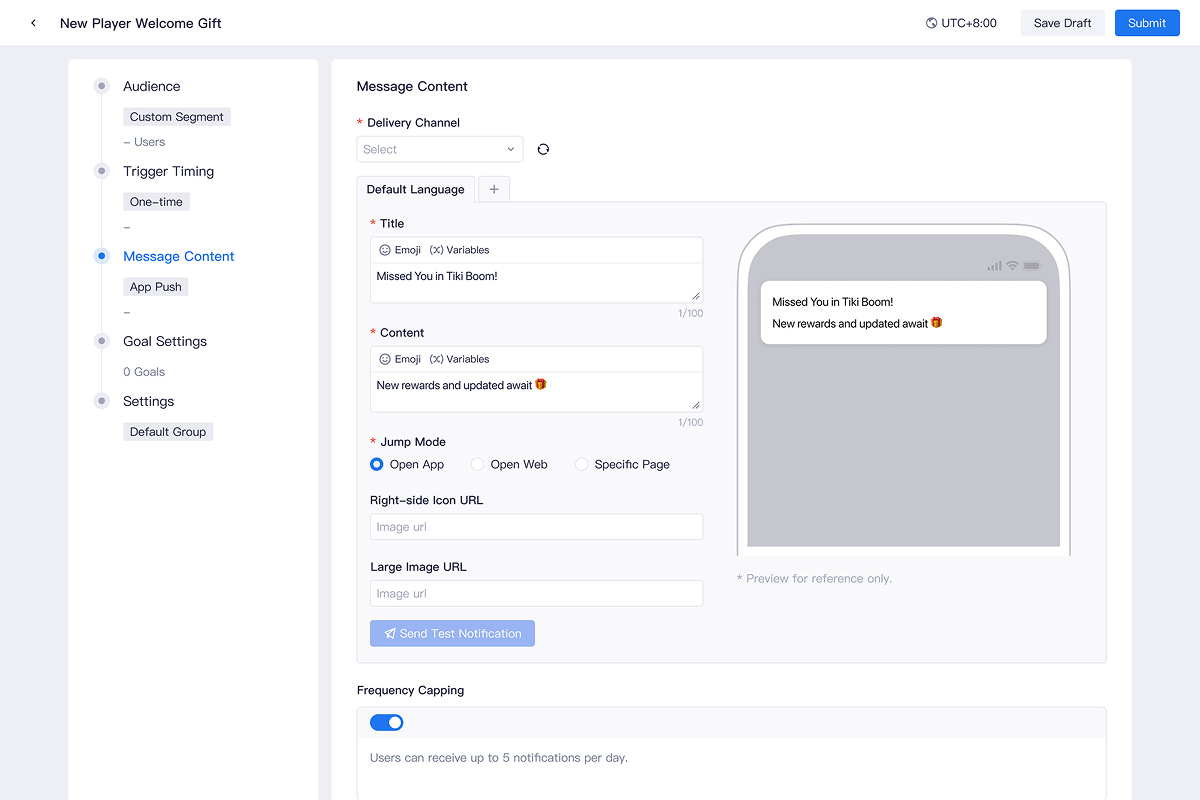
ThinkingData LiveOps is a no-code platform that helps game teams analyze player behavior, launch targeted in-game campaigns, and measure results in one place. This project focused on designing Push Campaign, a new capability that extended ThinkingData’s analytics strengths into campaign execution and performance review.
As the solo product designer, I led the 0-to-1 design in partnership with 1 product manager, four engineers, one user researcher, and cross-functional stakeholders. The challenge was not only to design a new workflow, but to introduce it on top of a mature analytics platform without making it feel disconnected from the rest of the product.
Within 6 months of launch, the LiveOps Platform was adopted by 30+ game studios, driving a 20% increase in annual revenue and establishing it as the company's second major revenue driver.
PMF validated
30+ studios
Annual revenue increased
20%
Become revenue driver
#2
As more game teams invested in engagement and lifecycle tooling, ThinkingData began exploring LiveOps as a new business direction. My role was to help turn that strategic direction into a product opportunity grounded in real workflows.
To understand where that opportunity should land, I led a user research to uncover how client teams moved from analysis to action. I found that our most mature customers were already using ThinkingData to identify retention risk and growth opportunities, but once they defined a target audience, they had to export the segment, configure the campaign in external tools, and then return to the analytics platform to evaluate results. The insight was valuable, the path to action was not.
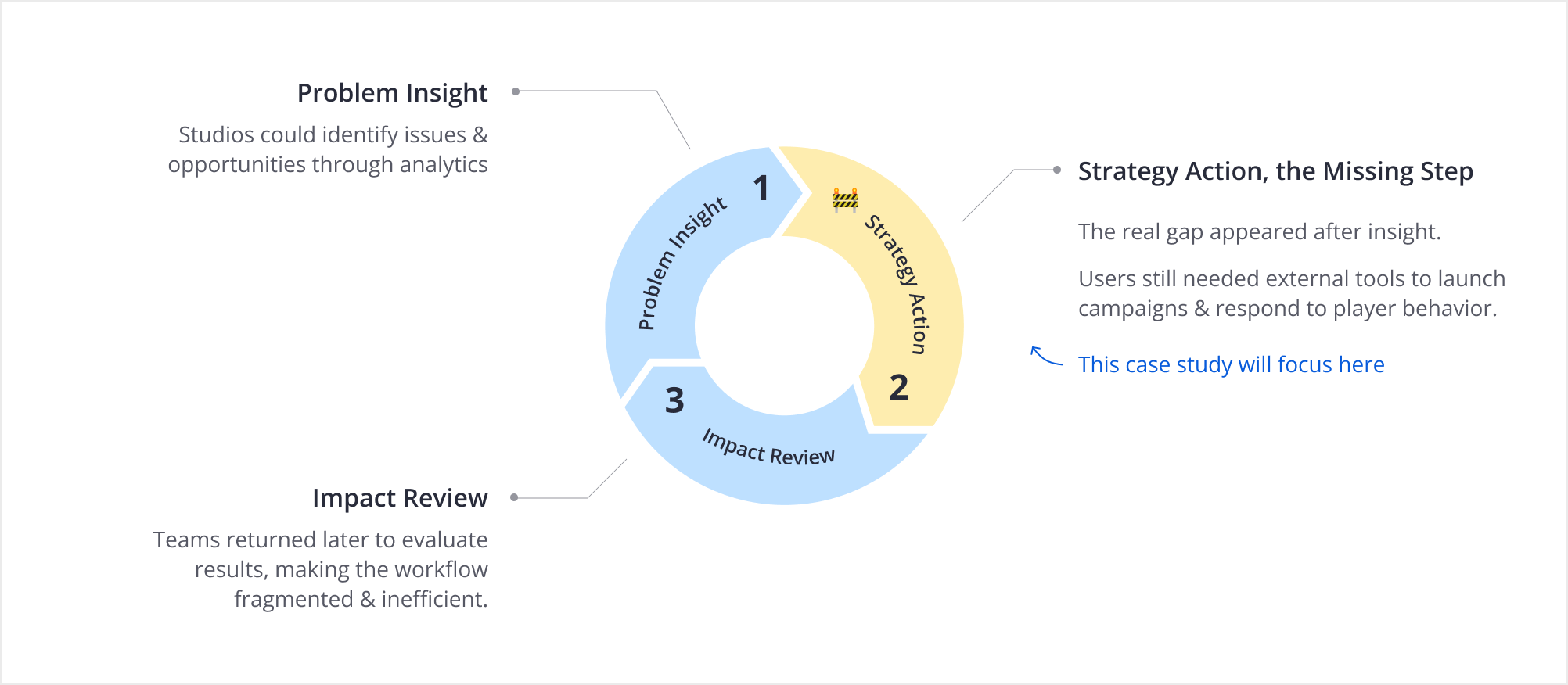
This was the right moment to act. We had internal product-monitoring evidence of the broken analysis-to-action loop, customer requests surfacing in parallel, and competitor platforms maturing in adjacent spaces. Waiting another release cycle would have meant watching existing customers adopt external solutions first, and losing the chance to own the full loop from insight to outcome.
Through video and in-person interviews, I mapped how operations teams collaborated across the full workflow. By synthesizing roles, responsibilities, and handoff points, I identified five core stages that shaped the foundation of the product design.
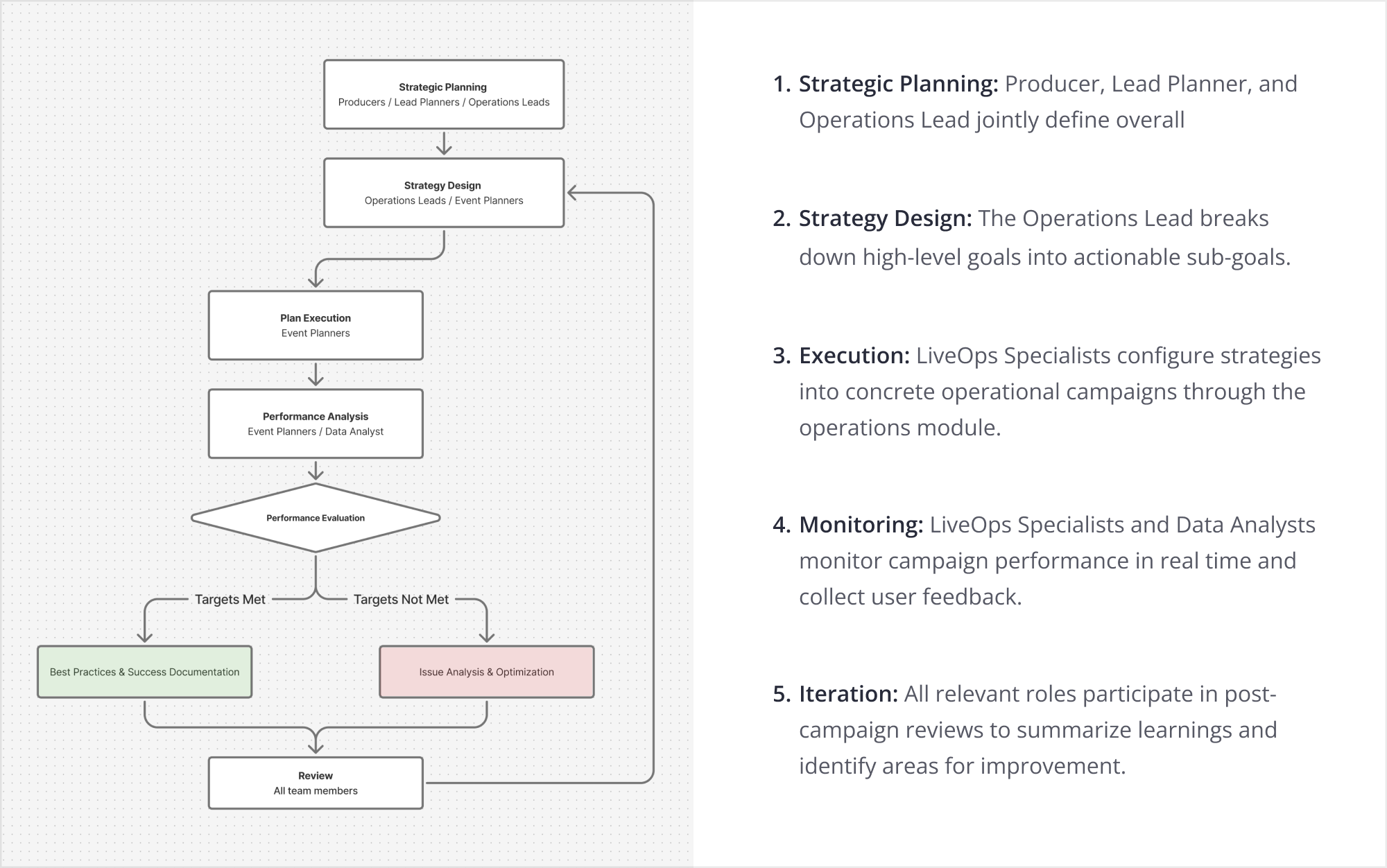
Two findings from the deeper research directly shaped the design direction. First, collaboration was complex. From planning to execution and iteration, multiple roles worked in parallel, so permissions could not be fixed. They needed to be flexible enough for each team to reflect its own org structure.
Second, I uncovered an unexpected approval gap. For larger customers, campaigns often required budget sign-off before launch because push notifications carried real costs at scale. Since third-party tools did not support this, teams handled approvals by email, leaving no clear status in the system. This reduced efficiency and increased the risk of launching campaigns before approval was confirmed.
To understand how mature engagement platforms had already approached this problem, I reviewed OneSignal, CleverTap, and EngageLab. I started by mapping each product's operational workflow, which broadly aligned with what my own research had surfaced. From there I moved laterally, comparing the design language of each stage users actually spend the most time in.
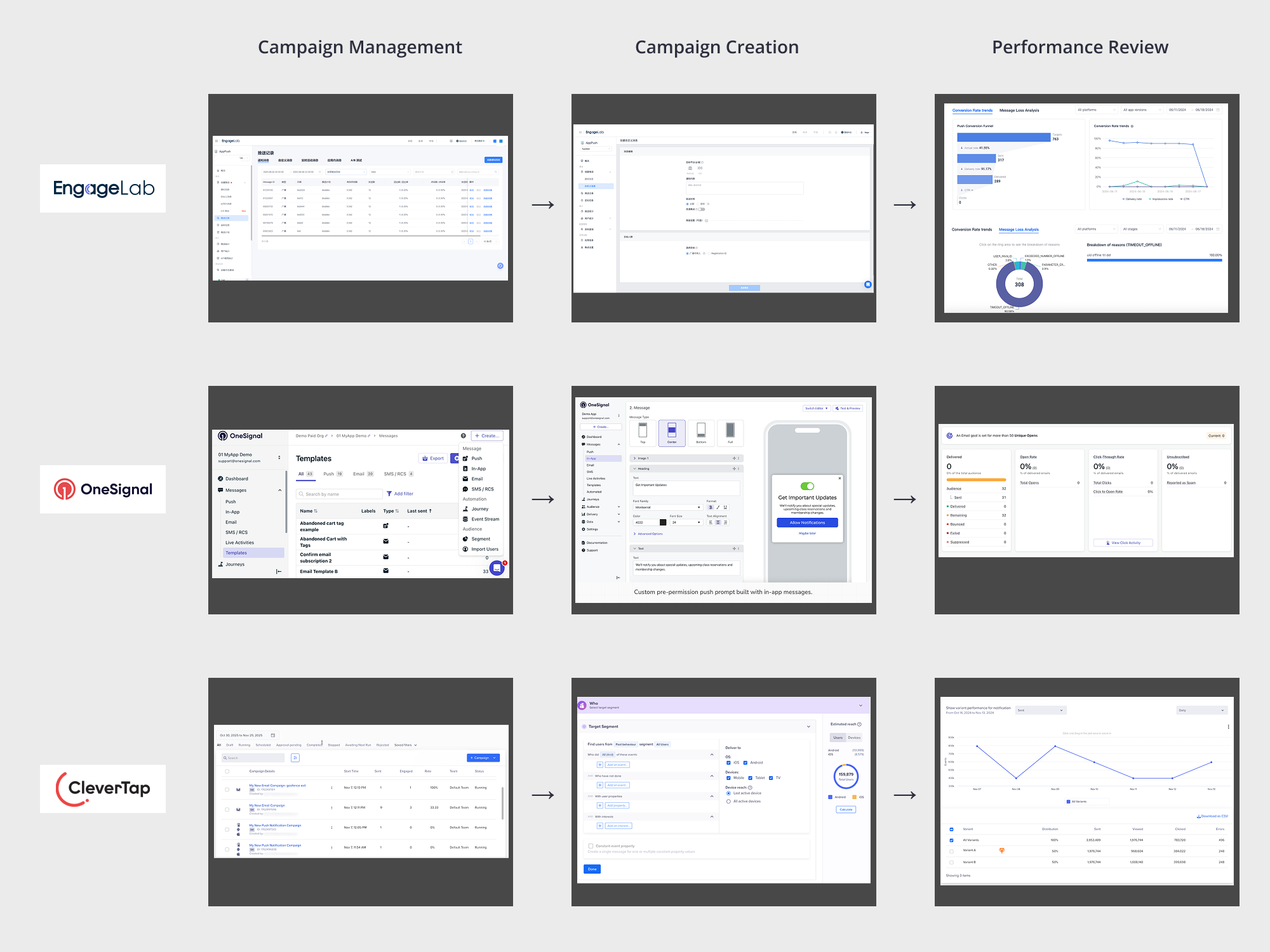
At the Campaign Management stage, all three products used a list view, but none treated approval as a first-class status. Their status columns only showed the campaign lifecycle, such as draft, scheduled, running, or ended. This confirmed the approval gap from my research and gave me a pattern to intentionally break.
Campaign Creation was the most complex stage. OneSignal and EngageLab used step-by-step flows, which kept each page focused but made cross-checking fields inefficient. CleverTap used collapsible modules on one page, which reduced page switching but became harder to scan when expanded. Neither pattern was strong enough to adopt directly.
At the Performance Review stage, EngageLab and OneSignal used funnel visualizations to show key conversion steps, which was worth borrowing. However, all three products missed the most important view for our users: results compared against the operational goals set during campaign creation. This became a clear design opportunity.
The project ran across eight bi-weekly sprints, with design and development moving in parallel. I wired validation checkpoints with users into every other sprint, both to de-risk the workflow before launch and to give us a structured place to challenge our own assumptions. Two moments along that timeline carried more weight than the rest, and they are what shaped V1 into what it actually became.
The first was a scope call. The company asked LiveOps to ship alongside the v4.0 platform release, roughly two months earlier than the original plan. The PM's ideal V1 included both Campaign Management and A/B testing. After several rounds with engineering on what was achievable inside the compressed window, I judged the combined-scope risk as high. Rather than escalate it as a blocker, I brought two independent release plans to the table:
We chose Plan B. The argument I made internally was that defending the core loop (segment, launch, measure) mattered more than feature breadth for a V1 customers were being asked to trust. A/B testing moved to V2.
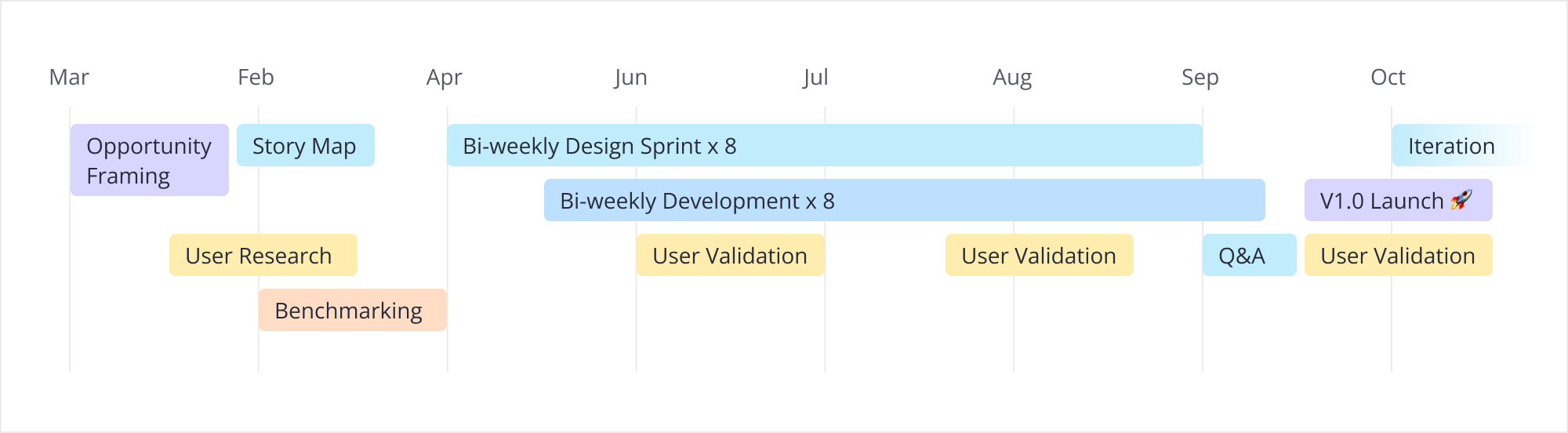
The second was the iteration room created by that scope call. Without it, issues found during validation would have been pushed to V2.
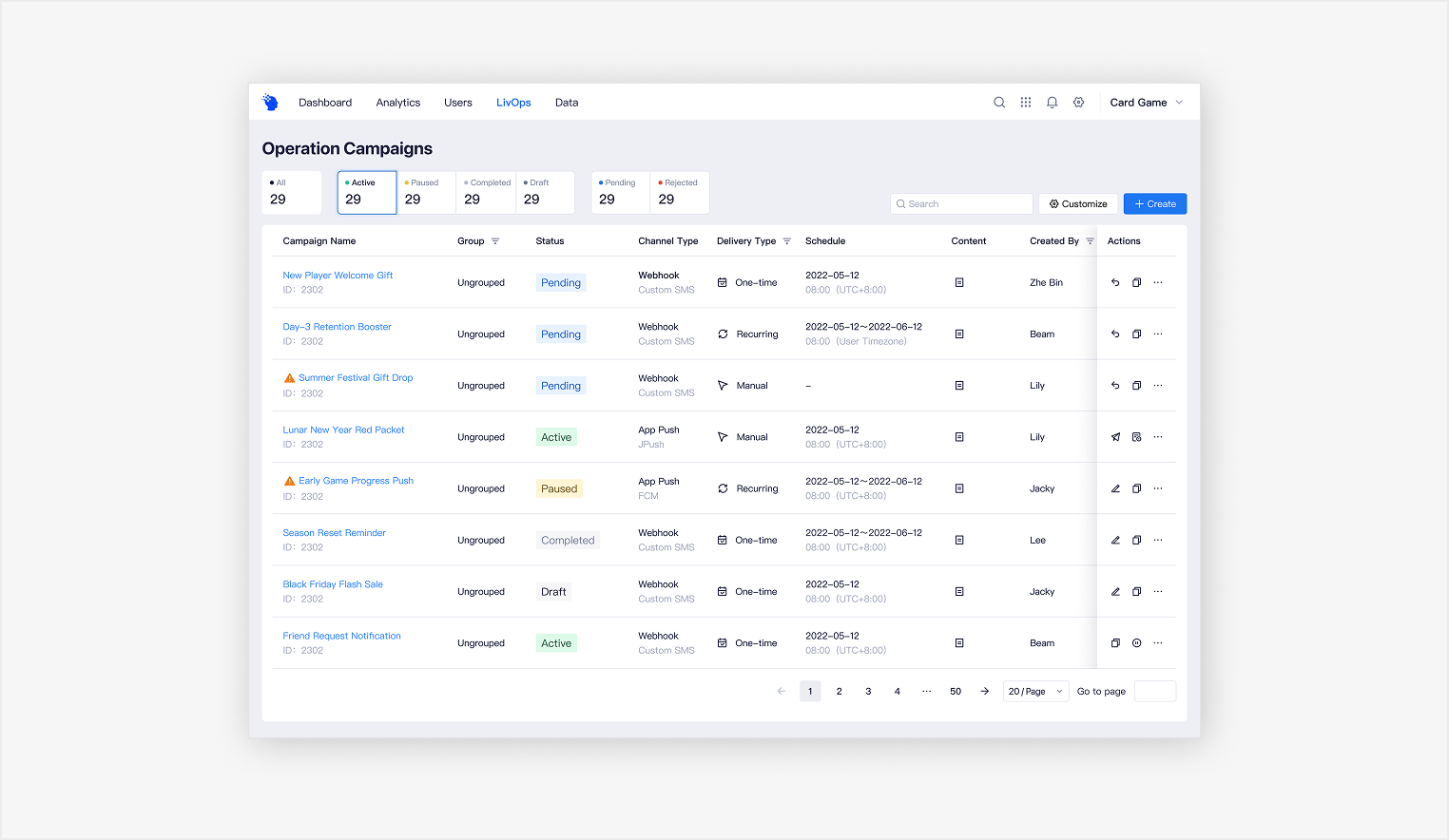
In the Campaign Management Hub, my first draft had treated approval as just another value inside the same status column as the rest of the campaign lifecycle (draft, scheduled, running, ended). Validation made it clear that approval did not behave like the others: users consistently treated pending-approval as a higher-priority signal they needed to locate first. So inside the status column itself, I separated approval state from the lifecycle states and gave it distinct visual weight, so the operations lead could spot pending approvals at a glance instead of scanning the entire list to find them.
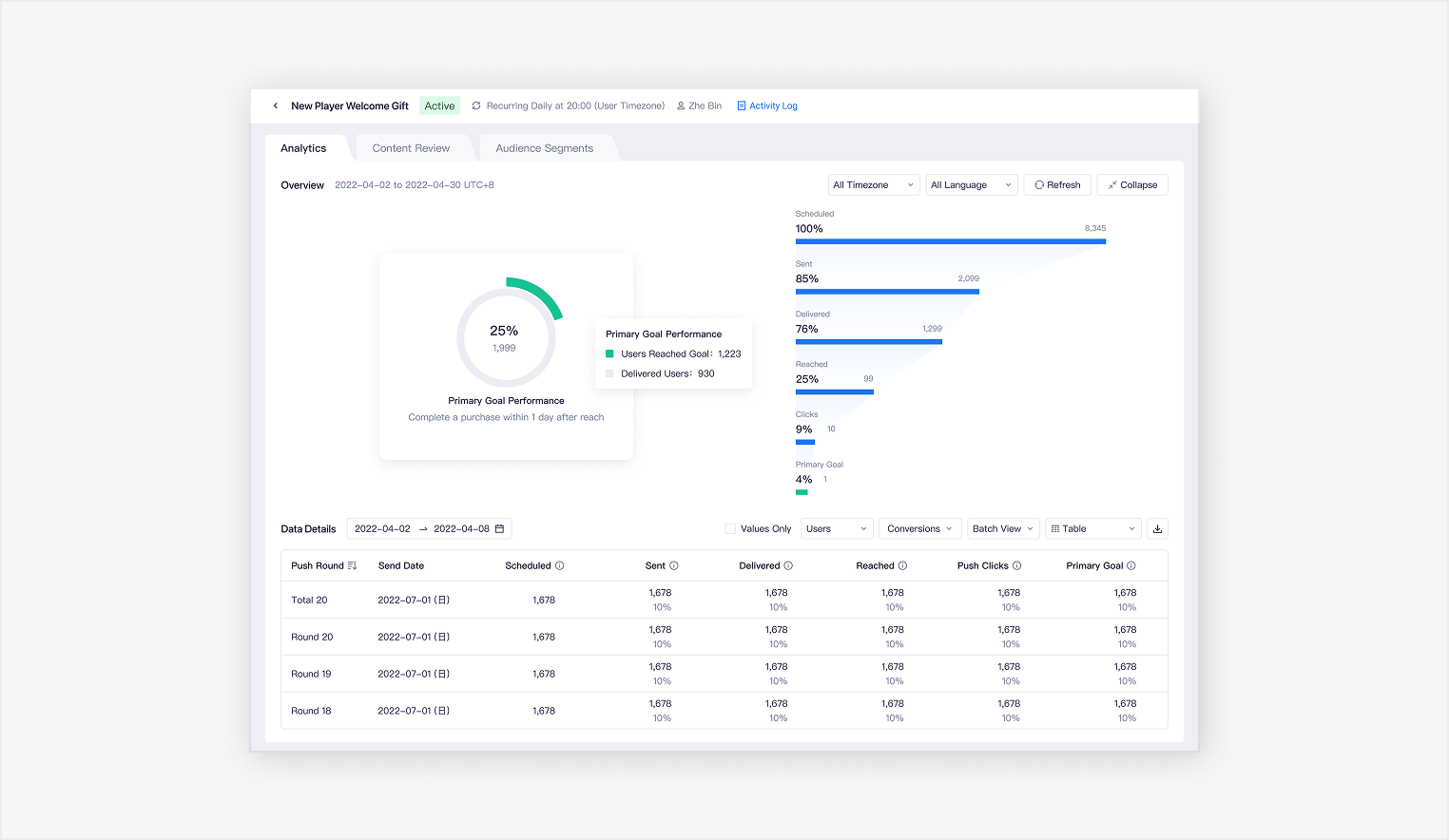
In the Campaign Review module, the Analytics overview was originally pinned at the top of the tab. Validation showed analysts only oriented on it once per session, then spent the rest of their time in batch-level data, where the pinned overview was eating screen space they actually needed. I made the overview collapsible so the same screen could serve a quick orientation read and a deep analysis session without forcing one to compromise the other.
Because LiveOps was a brand-new workflow, it required more than a new page. I collaborated with the design team to rebuild the information architecture of the global navigation.
Within the management view, I surfaced pending approvals separately from standard campaign statuses to reflect their higher operational priority and help users act on them faster. I also made the preview structure more flexible by supporting reorderable fields and direct edit access, allowing users to tailor the view to their own review habits and improve day-to-day efficiency.
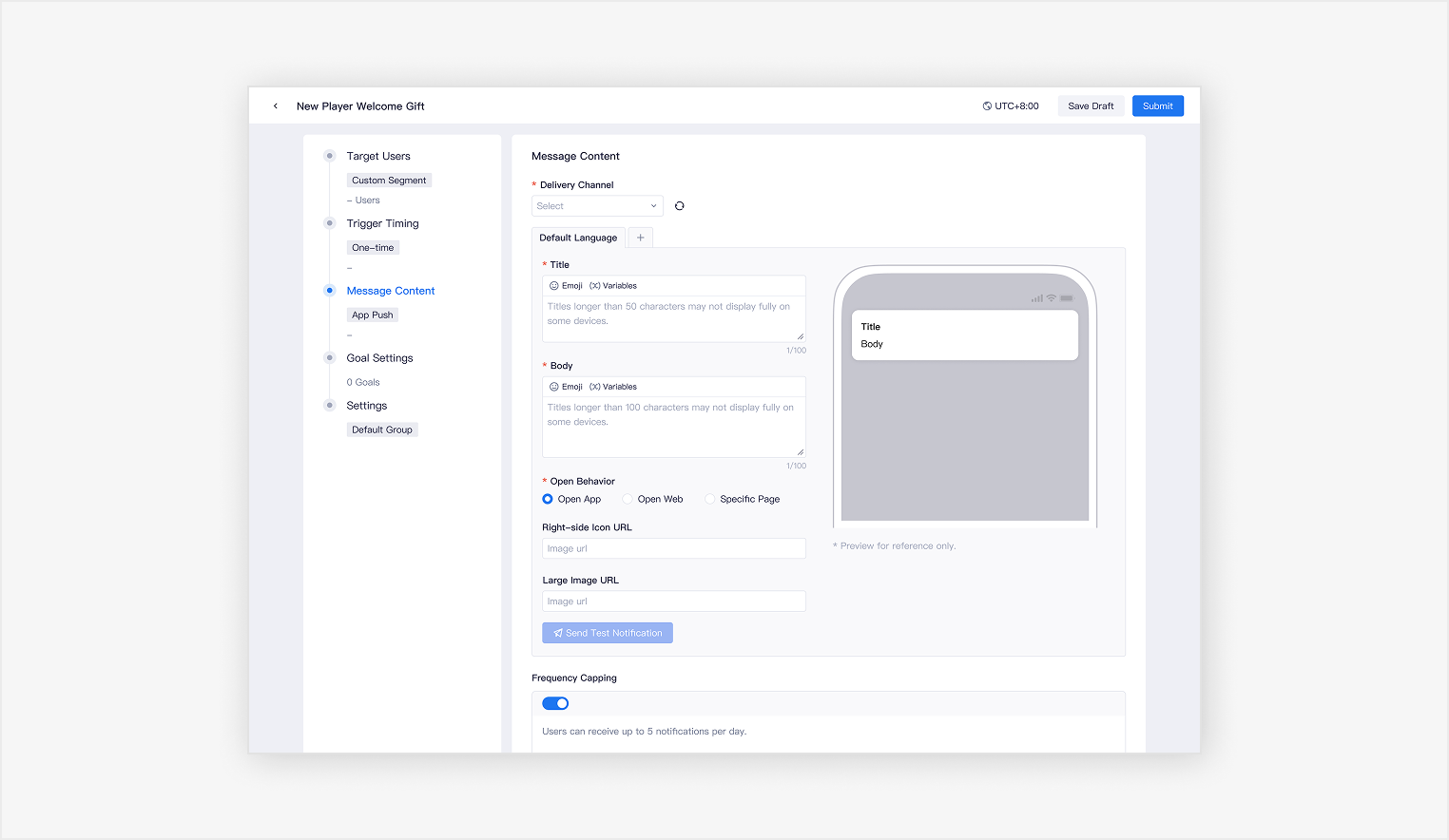
Campaign creation was designed to build on existing behavioral analytics, turning audience insight into direct execution. I integrated behavior-based segmentation into the workflow so users could activate target audiences directly within LiveOps instead of recreating them in a separate system.
To make setup easier to follow, I structured the experience as a guided, step-by-step flow across audience, timing, content, goals, and settings. I also paired the content form with a real-time preview, giving users immediate feedback while configuring the message and helping them review campaign details more confidently before launch.
I organized the campaign review experience into three dedicated tabs: Analytics, Content Review, and Audience Segments. This structure made the information easier to parse and allowed users to focus on one layer at a time, rather than working through a single, data-heavy page.
Within the Analytics tab, I designed the overview section to be collapsible. While the summary helped users quickly orient themselves, it did not need to remain visible throughout the entire analysis process. Collapsing it freed up more space for detailed metrics and batch-level data, making deeper analysis more efficient.
Designing a "0-to-1" product inside a mature ecosystem is a balancing act. As a new joiner, I had to fast-track my understanding of the domain. This ability to learn quickly helped me decode the existing product architecture and user habits, ensuring the new platform felt like a natural evolution, not a disruption.
On the other hands, this project proved that deep domain knowledge is a designer's strongest asset. Understanding the WHY behind the business logic allowed me to drive smoother cross-team alignment and reduce the risk of rework, leading to a successful, on-time delivery.